
Available only for Optimicapture pro
The Verification Station is a component of OptimiDoc Cloud designed to ensure the accuracy of data extracted through zonal OCR, AI‑based extraction, or manually entered during document capture and processing. It provides a critical human validation step within the workflow.
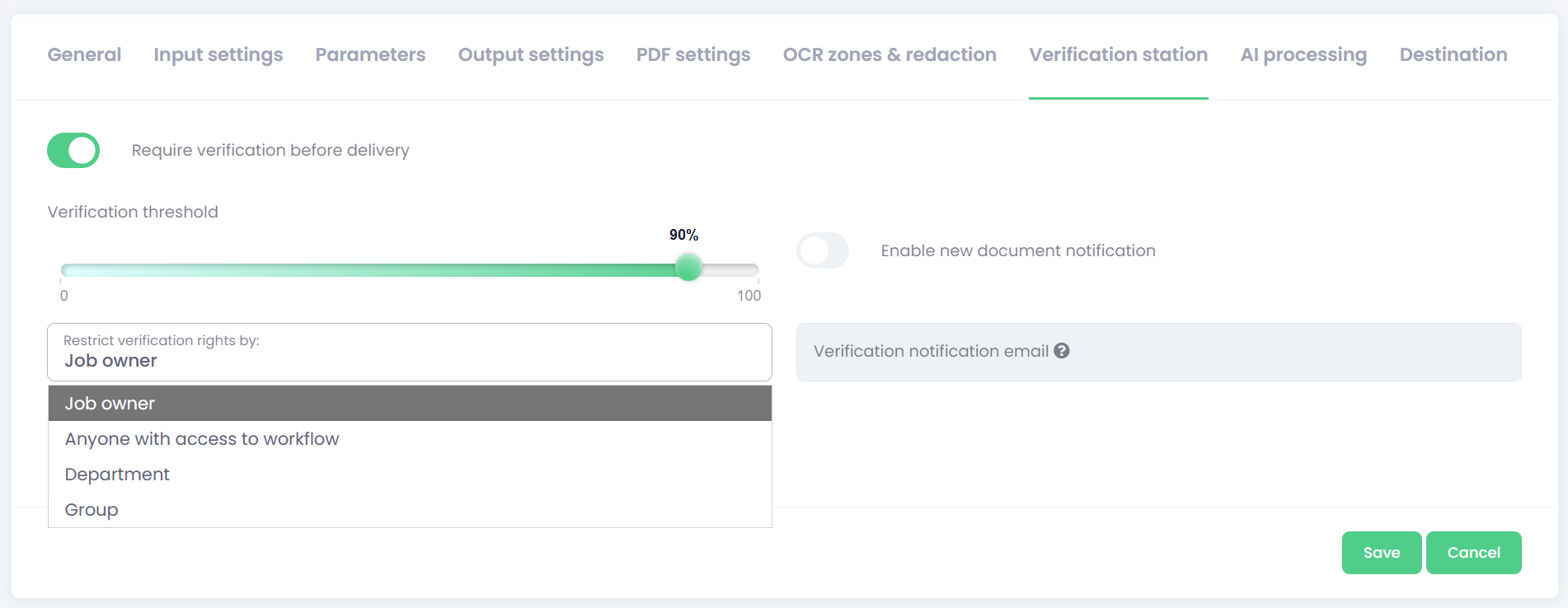
To enable the verification step in the document workflow, enable Require verification before delivery at the Verification station tab.
Configuration options:
-
Verification threshold – The verification threshold defines when a document must undergo human validation based on the AI confidence level. Each AI‑extracted field is assigned a percentage score reflecting how confident the system is in the extracted value. If any field falls below the configured threshold, verification is required. Setting the threshold to 100% means verification will always be required.
-
Restrict verification rights by - defines who will be able to verify waiting documents.
-
Job Owner - The user who scanned or submitted the document is responsible for verification.
-
Anyone with access to the workflow - Useful for small teams where everyone handles the same document types.
-
Specific Group - You must select the group from the OptimiDoc directory.
-
Example: Accounting, HR, AP Team
-
-
Department - Similar to group verification, but tied to department‑level structure.
-
-
Enable new document notification – When enabled, OptimiDoc sends an email notification either to the user who submitted the document or to a predefined email address.
The description of how to use the verification station is in the End-User guide.