
After the printer is installed by the OptimiDoc Cloud Client, the user can send print jobs directly to the selected device for immediate release.
Invoived components
-
Native Printing on the Workstation - the operating system’s standard print subsystem generates the print job using the installed printer driver and user‑selected print settings.
-
OptimiDoc Cloud Client - A lightweight agent that intercepts the print job, applies centrally defined policies (such as mono or duplex enforcement), and handles job delivery to the printing device.
-
Printer - The physical output device that receives the processed job directly from the OptimiDoc Cloud Client and executes the print with the requested finishing settings.
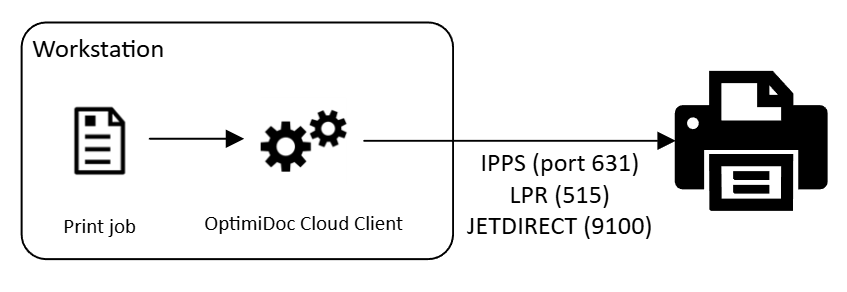
Direct Printing Dataflow
Below is a step‑by‑step outline of the direct‑printing dataflow:
-
The user submits a print job from the workstation.
-
The OptimiDoc Cloud Client locally spools the job and prepares it for processing.
-
Based on central configuration policies, the client may automatically convert the job to black‑and‑white or duplex before sending it. Document conversion is performed by modifying PCL or PS data.
-
OptimiDoc delivers the job to the selected printer using the workstation’s finishing settings, with transmission primarily performed over the IPPS protocol, or alternatively via LPR or JetDirect, depending on the device configuration.
If the printer is unavailable, the user is notified and prompted to choose how to proceed—postpone delivery, cancel the print job, or reroute it to another available device.